Getting started with API tracing
This notebook shows how to get started with API tracing.
Tracing is the process of collecting and examining information about activities that happen during program execution.
In particular, CUDA API tracing records the CUDA API calls issued by a program: their timing and their correlation with the GPU activities they launch, such as kernel executions.
NVIDIA provides Nsight Systems for this purpose.
ReProspect enables a fully programmatic use of this tool: it launches it, collects its output into Python data structures, and supports analyses of these data that can go all the way to test assertions.
As an example, we consider a program that launches four kernels with a diamond dependency structure. We programmatically trace its execution, examine the recorded CUDA API calls, and verify the concurrency structure.
About this page
This page is rendered from a Jupyter notebook, executed at documentation build time, located at docs/source/getting-started/example_api_tracing.ipynb in the repository.
To run the example yourself, download the notebook and open it in JupyterLab.
Alternatively, copy-paste the code snippets successively into an interactive Python session.
The requirements are Python 3.10 or newer and ReProspect:
python -m pip install reprospect
JupyterLab may be installed as:
python -m pip install jupyterlab
The example also requires:
a CUDA Toolkit installation providing
nvcc;an Nsight Systems CLI installation providing the command-line tool
nsys;the NVTX header
nvtx3/nvtx3.hpp(included in recent CUDA Toolkits; otherwise available from NVTX installation);a C++20-capable toolchain.
It should be noted that ReProspect provides the script reprospect.utils.installers.nsight_systems for installing Nsight Systems through apt.
Because tracing executes the program, a GPU is required.
Source code
Let us consider a program that launches four kernels with a diamond dependency structure:
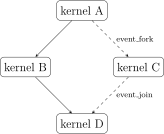
Four kernels with a diamond dependency structure
The four kernels are launched across two CUDA streams: kernels A, B, and D on one stream, and kernel C on the other, so that kernels B and C may potentially execute concurrently. Two of the dependencies are thus implied by stream order: A -> B and B -> D. The two cross-stream dependencies, A -> C and C -> D, are expressed with CUDA events, recorded on one stream and waited for on the other.
The source code features NVTX annotations, for two purposes.
On the one hand, the outer NVTX range start_end_range controls when Nsight Systems starts and stops collecting data.
On the other hand, the inner ranges diamond_range and check_range allow the analyses of the recorded activity to be scoped to these specific regions, as we will see below.
The ranges belong to a dedicated NVTX domain, which keeps them separate from other NVTX annotations, such as annotations that libraries used by an application may emit themselves.
CODE = """\
#include <cassert>
#include <source_location>
#include <sstream>
#include <stdexcept>

#include <cuda_runtime.h>
#include <nvtx3/nvtx3.hpp>

inline void check_cudart_call(
    const cudaError_t status,
    const char* const statement,
    const std::source_location& loc = std::source_location::current()) {
    if (status != cudaSuccess) {
        std::ostringstream oss;
        oss << statement << " failed: " << status << " (" << cudaGetErrorName(status)
            << "): " << cudaGetErrorString(status) << " (" << loc.file_name() << ":" << loc.line() << ")";

        throw std::runtime_error(oss.str());
    }
}

#define CHECK_CUDART_CALL(statement) check_cudart_call((statement), #statement)

__global__ void check_add_kernel(int* data, int prev, int val) {
    assert(*data == prev);
    *data += val;
}

__global__ void increment_kernel(int* data) {
    atomicAdd(data, 1);
}

struct ExampleApiTracingDomain {
    static constexpr char const * name{"example_api_tracing_domain"};
};

int main() {
    cudaStream_t stream_0, stream_1;
    CHECK_CUDART_CALL(cudaStreamCreate(&stream_0));
    CHECK_CUDART_CALL(cudaStreamCreate(&stream_1));

    cudaEvent_t event_fork, event_join;
    CHECK_CUDART_CALL(cudaEventCreateWithFlags(&event_fork, cudaEventDisableTiming));
    CHECK_CUDART_CALL(cudaEventCreateWithFlags(&event_join, cudaEventDisableTiming));

    int* data;
    CHECK_CUDART_CALL(cudaMallocAsync(&data, sizeof(int), stream_0));
    CHECK_CUDART_CALL(cudaMemsetAsync(data, 0, sizeof(int), stream_0));

    const auto start_end_range = nvtx3::start_range_in<ExampleApiTracingDomain>("start_end_range");

    {
        nvtx3::scoped_range_in<ExampleApiTracingDomain> diamond_range("diamond_range");
        check_add_kernel<<<1, 1, 0, stream_0>>>(data, 0, 4); // kernel A

        CHECK_CUDART_CALL(cudaEventRecord(event_fork, stream_0));

        increment_kernel<<<1, 1, 0, stream_0>>>(data); // kernel B

        CHECK_CUDART_CALL(cudaStreamWaitEvent(stream_1, event_fork));
        increment_kernel<<<1, 1, 0, stream_1>>>(data); // kernel C

        CHECK_CUDART_CALL(cudaEventRecord(event_join, stream_1));
        CHECK_CUDART_CALL(cudaStreamWaitEvent(stream_0, event_join));

        check_add_kernel<<<1, 1, 0, stream_0>>>(data, 6, 3); // kernel D
    }

    {
        nvtx3::scoped_range_in<ExampleApiTracingDomain> check_range("check_range");
        int data_h;

        CHECK_CUDART_CALL(cudaMemcpyAsync(&data_h, data, sizeof(int), cudaMemcpyDeviceToHost, stream_0));
        CHECK_CUDART_CALL(cudaStreamSynchronize(stream_0));

        if (data_h != 9) {
            throw std::runtime_error("wrong value");
        }
    }

    nvtx3::end_range_in<ExampleApiTracingDomain>(start_end_range);

    CHECK_CUDART_CALL(cudaFreeAsync(data, stream_0));

    CHECK_CUDART_CALL(cudaEventDestroy(event_fork));
    CHECK_CUDART_CALL(cudaEventDestroy(event_join));

    CHECK_CUDART_CALL(cudaStreamDestroy(stream_0));
    CHECK_CUDART_CALL(cudaStreamDestroy(stream_1));
}
"""
Compilation
Because this example will execute the program, we compile the source code for the native architecture, i.e., the architecture of the GPU present on the machine.
import pathlib
import subprocess

from reprospect.utils import rich_helpers
from reprospect.utils.detect import GPUDetector

print(subprocess.check_output(('nvcc', '--version')).decode().strip())

print(subprocess.check_output(('nsys', '--version')).decode().strip())

visible_gpus = GPUDetector().detect()
print(f'Visible GPUs:\n{rich_helpers.to_string(rich_helpers.df_to_table(visible_gpus))}')

workdir = pathlib.Path.cwd() / 'example_api_tracing'
workdir.mkdir(exist_ok=True)
print(f'Working directory: {workdir}')

source = workdir / 'concurrency.cu'
executable = workdir / 'concurrency'

source.write_text(CODE)
_ = subprocess.check_call(('nvcc', '-arch=native', '-std=c++20', '-O3', '-o', executable, source))
nvcc: NVIDIA (R) Cuda compiler driver
Copyright (c) 2005-2026 NVIDIA Corporation
Built on Mon_Aug_03_13:24:11_PDT_2026
Cuda compilation tools, release 13.4, V13.4.59
Build cuda_13.4.r13.4/compiler.38657139_0
NVIDIA Nsight Systems version 2026.3.2.476-263238834031v0
Visible GPUs:
┏━━━━━━━━━━━━━━━━━━━━━━━━━━━━━━━━━━━━━━━━━━┳━━━━━━━┳━━━━━━━━━━━━━━━━━━━━━━━━━━━━┳━━━━━━━━━━━━━┳━━━━━━━━━━━━━━┓
┃ uuid                                     ┃ index ┃ name                       ┃ compute_cap ┃ architecture ┃
┡━━━━━━━━━━━━━━━━━━━━━━━━━━━━━━━━━━━━━━━━━━╇━━━━━━━╇━━━━━━━━━━━━━━━━━━━━━━━━━━━━╇━━━━━━━━━━━━━╇━━━━━━━━━━━━━━┩
│ GPU-d27df728-7612-809e-697e-38da9785efa3 │ 0     │ NVIDIA GeForce RTX 5070 Ti │ 12.0        │ BLACKWELL120 │
│ GPU-f0b17181-5e70-f633-ed96-14cf7e77e8e9 │ 1     │ NVIDIA GeForce RTX 5070 Ti │ 12.0        │ BLACKWELL120 │
└──────────────────────────────────────────┴───────┴────────────────────────────┴─────────────┴──────────────┘

Working directory: /tmp/tmpy8dg56oq/example_api_tracing
Here, reprospect.utils.detect.GPUDetector is a utility class to detect the visible GPUs through an nvidia-smi query.
It returns the data collected about the visible GPUs as a pandas.DataFrame.
The module reprospect.utils.rich_helpers provides functionality for rich rendering of such data frames.
Running API tracing
Nsight Systems provides the command-line tool nsys for collecting data from the execution of a program.
Here, we invoke it through the ReProspect class reprospect.tools.nsys.session.Session.
The argument executable designates the executable on which to collect data.
The argument nvtx_capture is the NVTX range that controls when data collection starts and stops.
The value 'start_end_range@example_api_tracing_domain' follows the nsys convention <range>@<domain>.
The argument output determines the output file; for the passed value workdir / executable.name, the report is written to workdir / f'{executable.name}.nsys-rep'.
from reprospect.tools.nsys import Command, Session

ns = Session(
    command=Command(
        executable=executable,
        output=workdir / executable.name,
        nvtx_capture='start_end_range@example_api_tracing_domain',
    ),
)

ns.run(cwd=workdir)
Capture range started in the application.
Capture range ended in the application.
Generating '/tmp/nsys-root/nsys-report-3af5.qdstrm'
[1/1] [0%                          ] concurrency.nsys-repProcessing events...
[1/1] [========================100%] concurrency.nsys-rep
Generated:
	/tmp/tmpy8dg56oq/example_api_tracing/concurrency.nsys-rep
CUDA API Trace default report
Nsight Systems provides its own functionality for post-processing the collected data into summary and trace reports, as described here. Nsight Systems generates these default reports through SQL queries on an SQLite export of the output file.
The ReProspect method reprospect.tools.nsys.session.Session.extract_statistical_report() allows such reports to be retrieved as a pandas.DataFrame.
Here, we retrieve the report named cuda_api_trace, which contains a trace of the CUDA API calls, with their start times and durations.
We first export the .nsys-rep report to an SQLite database.
The method extract_statistical_report() then invokes nsys stats on this database.
The same database will be queried directly in the sections below.
sqlite_database = ns.export_to_sqlite(cwd=workdir)
print(f'SQLite database: {sqlite_database}')
Processing 66 events:
SQLite database: /tmp/tmpy8dg56oq/example_api_tracing/concurrency.sqlite
[==========================================================================100%]
cuda_api_trace_report = ns.extract_statistical_report(report='cuda_api_trace')
print(f'Nsight Systems cuda_api_trace report:\n{rich_helpers.to_string(rich_helpers.df_to_table(cuda_api_trace_report))}')
Processing [/tmp/tmpy8dg56oq/example_api_tracing/concurrency.sqlite] with [/opt/nvidia/nsight-systems/2026.3.2/target-linux-x64/reports/cuda_api_trace.py] to [/tmp/tmpy8dg56oq/example_api_tracing/concurrency_cuda_api_trace.csv]... PROCESSED
Nsight Systems cuda_api_trace report:
┏━━━━━━━━━━━━┳━━━━━━━━━━━━━━━┳━━━━━━━━━━━━━━━━━━━━━━━┳━━━━━━━━┳━━━━━━━━┳━━━━━┳━━━━━┳━━━━━━━┳━━━━━━━━━━━━━┓
┃ Start (us) ┃ Duration (us) ┃ Name                  ┃ Result ┃ CorrID ┃ Pid ┃ Tid ┃ T-Pri ┃ Thread Name ┃
┡━━━━━━━━━━━━╇━━━━━━━━━━━━━━━╇━━━━━━━━━━━━━━━━━━━━━━━╇━━━━━━━━╇━━━━━━━━╇━━━━━╇━━━━━╇━━━━━━━╇━━━━━━━━━━━━━┩
│ 27642.137  │ 108.062       │ cuLibraryLoadData     │ 0      │ 2      │ 656 │ 656 │ 20    │ concurrency │
│ 27751.051  │ 0.651         │ cuLibraryGetKernel    │ 0      │ 3      │ 656 │ 656 │ 20    │ concurrency │
│ 27755.489  │ 0.471         │ cuKernelGetName       │ 0      │ 4      │ 656 │ 656 │ 20    │ concurrency │
│ 27757.563  │ 1987.569      │ cudaLaunchKernel      │ 0      │ 5      │ 656 │ 656 │ 20    │ concurrency │
│ 29745.944  │ 5.51          │ cudaEventRecord       │ 0      │ 6      │ 656 │ 656 │ 20    │ concurrency │
│ 29752.266  │ 0.38          │ cuLibraryGetKernel    │ 0      │ 7      │ 656 │ 656 │ 20    │ concurrency │
│ 29753.428  │ 0.17          │ cuKernelGetName       │ 0      │ 8      │ 656 │ 656 │ 20    │ concurrency │
│ 29753.698  │ 10.48         │ cudaLaunchKernel      │ 0      │ 9      │ 656 │ 656 │ 20    │ concurrency │
│ 29764.719  │ 5.2           │ cudaStreamWaitEvent   │ 0      │ 10     │ 656 │ 656 │ 20    │ concurrency │
│ 29770.119  │ 0.16          │ cuKernelGetName       │ 0      │ 11     │ 656 │ 656 │ 20    │ concurrency │
│ 29770.34   │ 3.837         │ cudaLaunchKernel      │ 0      │ 12     │ 656 │ 656 │ 20    │ concurrency │
│ 29774.307  │ 0.892         │ cudaEventRecord       │ 0      │ 13     │ 656 │ 656 │ 20    │ concurrency │
│ 29775.319  │ 0.591         │ cudaStreamWaitEvent   │ 0      │ 14     │ 656 │ 656 │ 20    │ concurrency │
│ 29776.15   │ 0.151         │ cuKernelGetName       │ 0      │ 15     │ 656 │ 656 │ 20    │ concurrency │
│ 29776.411  │ 2.855         │ cudaLaunchKernel      │ 0      │ 16     │ 656 │ 656 │ 20    │ concurrency │
│ 29781.941  │ 32.932        │ cudaMemcpyAsync       │ 0      │ 17     │ 656 │ 656 │ 20    │ concurrency │
│ 29815.344  │ 3.777         │ cudaStreamSynchronize │ 0      │ 18     │ 656 │ 656 │ 20    │ concurrency │
└────────────┴───────────────┴───────────────────────┴────────┴────────┴─────┴─────┴───────┴─────────────┘
Querying CUDA API tracing data
Beyond the default reports of the previous section, the Nsight Systems documentation recommends the SQLite export of the .nsys-rep file as the primary means for custom analyses of the collected data, with full access to all recorded details and their correlations.
The Nsight Systems documentation provides the SQLite schema reference here.
The ReProspect class reprospect.tools.nsys.report.Report provides access to the database.
The class is used as a context manager, which opens and closes the connection to the database.
The property reprospect.tools.nsys.report.Report.tables provides a list of the names of the tables available in the database.
from reprospect.tools.nsys import Report

report = Report(db=ns.command.output.with_suffix('.sqlite'))

with report:
    tables = report.tables
    print(f'Tables:\n{tables}')
Tables:
['StringIds', 'ANALYSIS_FILE', 'ProcessStreams', 'TARGET_INFO_SYSTEM_ENV', 'TARGET_INFO_SESSION_START_TIME', 'ANALYSIS_DETAILS', 'DIAGNOSTIC_EVENT', 'PROCESSES', 'CUPTI_ACTIVITY_KIND_RUNTIME', 'CUPTI_ACTIVITY_KIND_CUDA_EVENT', 'CUPTI_ACTIVITY_KIND_KERNEL', 'CUPTI_ACTIVITY_KIND_MEMCPY', 'CUPTI_ACTIVITY_KIND_SYNCHRONIZATION', 'CUPTI_ACTIVITY_KIND_OVERHEAD', 'NVTX_EVENTS', 'PROFILER_OVERHEAD', 'ThreadNames', 'TARGET_INFO_GPU', 'TARGET_INFO_CUDA_DEVICE', 'TARGET_INFO_CUDA_CONTEXT_INFO', 'TARGET_INFO_CUDA_STREAM', 'ENUM_NSYS_EVENT_TYPE', 'ENUM_NSYS_EVENT_CLASS', 'ENUM_NSYS_GENERIC_EVENT_SOURCE', 'ENUM_NSYS_GENERIC_EVENT_GROUP', 'ENUM_NSYS_GENERIC_EVENT_FIELD_TYPE', 'ENUM_NSYS_GENERIC_EVENT_FIELD_ETW_PROPERTY', 'ENUM_NSYS_GENERIC_EVENT_FIELD_ETW_TYPE', 'ENUM_NSYS_GENERIC_EVENT_FIELD_ETW_FLAGS', 'ENUM_CUDA_MEMCPY_OPER', 'ENUM_CUDA_MEM_KIND', 'ENUM_CUDA_MEMPOOL_TYPE', 'ENUM_CUDA_MEMPOOL_OPER', 'ENUM_CUDA_DEV_MEM_EVENT_OPER', 'ENUM_CUDA_KERNEL_LAUNCH_TYPE', 'ENUM_CUDA_SHARED_MEM_LIMIT_CONFIG', 'ENUM_CUDA_UNIF_MEM_MIGRATION', 'ENUM_CUDA_UNIF_MEM_ACCESS_TYPE', 'ENUM_CUDA_FUNC_CACHE_CONFIG', 'ENUM_CUPTI_STREAM_TYPE', 'ENUM_CUPTI_SYNC_TYPE', 'ENUM_CUPTI_OVERHEAD_TYPE', 'ENUM_CUPTI_JIT_ENTRY_TYPE', 'ENUM_CUPTI_JIT_OPERATION_TYPE', 'ENUM_DIAGNOSTIC_SEVERITY_LEVEL', 'ENUM_DIAGNOSTIC_SOURCE_TYPE', 'ENUM_DIAGNOSTIC_TIMESTAMP_SOURCE', 'META_DATA_CAPTURE', 'META_DATA_EXPORT']
The method reprospect.tools.nsys.report.Report.table() retrieves a table as a pandas.DataFrame.
Let us retrieve the tables:
CUPTI_ACTIVITY_KIND_RUNTIMEwith the trace of the CUDA runtime API calls;CUPTI_ACTIVITY_KIND_CUDA_EVENTwith details relevant to the CUDA events;CUPTI_ACTIVITY_KIND_SYNCHRONIZATIONwith details relevant to the CUDA synchronization operations;CUPTI_ACTIVITY_KIND_KERNELwith details relevant to the kernel executions;ENUM_NSYS_EVENT_CLASS, which we will use below to interpret theeventClasscolumn of the runtime table;StringIds, which relates string identifiers to the strings themselves.
Here, CUPTI stands for the CUDA Profiling Tools Interface (CUPTI), which Nsight Systems uses to collect the associated data.
with report:
    runtime = report.table(name='CUPTI_ACTIVITY_KIND_RUNTIME')
    print(f'Table CUPTI_ACTIVITY_KIND_RUNTIME:\n{rich_helpers.to_string(rich_helpers.df_to_table(runtime))}')

    cuda_event = report.table(name='CUPTI_ACTIVITY_KIND_CUDA_EVENT')
    print(f'Table CUPTI_ACTIVITY_KIND_CUDA_EVENT:\n{rich_helpers.to_string(rich_helpers.df_to_table(cuda_event))}')

    synchronization = report.table(name='CUPTI_ACTIVITY_KIND_SYNCHRONIZATION')
    print(f'Table CUPTI_ACTIVITY_KIND_SYNCHRONIZATION:\n{rich_helpers.to_string(rich_helpers.df_to_table(synchronization))}')

    kernel = report.table(name='CUPTI_ACTIVITY_KIND_KERNEL')
    print(f'Table CUPTI_ACTIVITY_KIND_KERNEL, for brevity only its column names:\n{kernel.columns}')

    enum_event_class = report.table(name='ENUM_NSYS_EVENT_CLASS')
    print(f'Table ENUM_NSYS_EVENT_CLASS first two rows:\n{rich_helpers.to_string(rich_helpers.df_to_table(enum_event_class[:2]))}')

    stringids = report.table(name='StringIds')
    first_runtime_row = runtime.iloc[0]
    print(f'Table StringIds row related to first runtime table row:\n{rich_helpers.to_string(rich_helpers.df_to_table(stringids[stringids["id"] == first_runtime_row["nameId"]]))}')
Table CUPTI_ACTIVITY_KIND_RUNTIME:
┏━━━━━━━━━━┳━━━━━━━━━━┳━━━━━━━━━━━━┳━━━━━━━━━━━━━━━━━┳━━━━━━━━━━━━━━━┳━━━━━━━━┳━━━━━━━━━━━━━┳━━━━━━━━━━━━━┓
┃ start    ┃ end      ┃ eventClass ┃ globalTid       ┃ correlationId ┃ nameId ┃ returnValue ┃ callchainId ┃
┡━━━━━━━━━━╇━━━━━━━━━━╇━━━━━━━━━━━━╇━━━━━━━━━━━━━━━━━╇━━━━━━━━━━━━━━━╇━━━━━━━━╇━━━━━━━━━━━━━╇━━━━━━━━━━━━━┩
│ 27642137 │ 27750199 │ 1          │ 281485982565008 │ 2             │ 24     │ 0           │ None        │
│ 27751051 │ 27751702 │ 1          │ 281485982565008 │ 3             │ 26     │ 0           │ None        │
│ 27755489 │ 27755960 │ 1          │ 281485982565008 │ 4             │ 27     │ 0           │ None        │
│ 29752266 │ 29752646 │ 1          │ 281485982565008 │ 7             │ 26     │ 0           │ None        │
│ 29753428 │ 29753598 │ 1          │ 281485982565008 │ 8             │ 27     │ 0           │ None        │
│ 29770119 │ 29770279 │ 1          │ 281485982565008 │ 11            │ 27     │ 0           │ None        │
│ 29776150 │ 29776301 │ 1          │ 281485982565008 │ 15            │ 27     │ 0           │ None        │
│ 27757563 │ 29745132 │ 0          │ 281485982565008 │ 5             │ 31     │ 0           │ None        │
│ 29745944 │ 29751454 │ 0          │ 281485982565008 │ 6             │ 32     │ 0           │ None        │
│ 29753698 │ 29764178 │ 0          │ 281485982565008 │ 9             │ 31     │ 0           │ None        │
│ 29764719 │ 29769919 │ 0          │ 281485982565008 │ 10            │ 35     │ 0           │ None        │
│ 29770340 │ 29774177 │ 0          │ 281485982565008 │ 12            │ 31     │ 0           │ None        │
│ 29774307 │ 29775199 │ 0          │ 281485982565008 │ 13            │ 32     │ 0           │ None        │
│ 29775319 │ 29775910 │ 0          │ 281485982565008 │ 14            │ 35     │ 0           │ None        │
│ 29776411 │ 29779266 │ 0          │ 281485982565008 │ 16            │ 31     │ 0           │ None        │
│ 29781941 │ 29814873 │ 0          │ 281485982565008 │ 17            │ 36     │ 0           │ None        │
│ 29815344 │ 29819121 │ 0          │ 281485982565008 │ 18            │ 37     │ 0           │ None        │
└──────────┴──────────┴────────────┴─────────────────┴───────────────┴────────┴─────────────┴─────────────┘
Table CUPTI_ACTIVITY_KIND_CUDA_EVENT:
┏━━━━━━━━━━━┳━━━━━━━━━━┳━━━━━━━━━━━┳━━━━━━━━━━━━━━━━┳━━━━━━━━━━┳━━━━━━━━━━━━━━━┳━━━━━━━━━━━━━━━━━┳━━━━━━━━━┳━━━━━━━━━━━━━┓
┃ timestamp ┃ deviceId ┃ contextId ┃ greenContextId ┃ streamId ┃ correlationId ┃ globalPid       ┃ eventId ┃ eventSyncId ┃
┡━━━━━━━━━━━╇━━━━━━━━━━╇━━━━━━━━━━━╇━━━━━━━━━━━━━━━━╇━━━━━━━━━━╇━━━━━━━━━━━━━━━╇━━━━━━━━━━━━━━━━━╇━━━━━━━━━╇━━━━━━━━━━━━━┩
│ 0         │ 0        │ 1         │ 0              │ 14       │ 6             │ 281485982564352 │ 1       │ 1           │
│ 0         │ 0        │ 1         │ 0              │ 15       │ 13            │ 281485982564352 │ 2       │ 2           │
└───────────┴──────────┴───────────┴────────────────┴──────────┴───────────────┴─────────────────┴─────────┴─────────────┘
Table CUPTI_ACTIVITY_KIND_SYNCHRONIZATION:
┏━━━━━━━━━━┳━━━━━━━━━━┳━━━━━━━━━━┳━━━━━━━━━━━┳━━━━━━━━━━━━━━━━┳━━━━━━━━━━┳━━━━━━━━━━━━━━━┳━━━━━━━━━━━━━━━━━┳━━━━━━━━━━━━━━━━━━━━┳━━━━━━━━━━┳━━━━━━━━━━━━┳━━━━━━━━━━━━━┓
┃ start    ┃ end      ┃ deviceId ┃ contextId ┃ greenContextId ┃ streamId ┃ correlationId ┃ globalPid       ┃ deprecatedSyncType ┃ syncType ┃ eventId    ┃ eventSyncId ┃
┡━━━━━━━━━━╇━━━━━━━━━━╇━━━━━━━━━━╇━━━━━━━━━━━╇━━━━━━━━━━━━━━━━╇━━━━━━━━━━╇━━━━━━━━━━━━━━━╇━━━━━━━━━━━━━━━━━╇━━━━━━━━━━━━━━━━━━━━╇━━━━━━━━━━╇━━━━━━━━━━━━╇━━━━━━━━━━━━━┩
│ 29765671 │ 29769278 │ 0        │ 1         │ 0              │ 15       │ 10            │ 281485982564352 │ None               │ 2        │ 1          │ 1           │
│ 29775399 │ 29775800 │ 0        │ 1         │ 0              │ 14       │ 14            │ 281485982564352 │ None               │ 2        │ 2          │ 2           │
│ 29816015 │ 29818910 │ 0        │ 1         │ 0              │ 14       │ 18            │ 281485982564352 │ None               │ 3        │ 4294967295 │ 0           │
└──────────┴──────────┴──────────┴───────────┴────────────────┴──────────┴───────────────┴─────────────────┴────────────────────┴──────────┴────────────┴─────────────┘

Table CUPTI_ACTIVITY_KIND_KERNEL, for brevity only its column names:
Index(['start', 'end', 'deviceId', 'contextId', 'greenContextId', 'streamId',
       'correlationId', 'globalPid', 'demangledName', 'shortName',
       'mangledName', 'launchType', 'cacheConfig', 'registersPerThread',
       'gridX', 'gridY', 'gridZ', 'blockX', 'blockY', 'blockZ',
       'staticSharedMemory', 'dynamicSharedMemory', 'localMemoryPerThread',
       'localMemoryTotal', 'gridId', 'sharedMemoryExecuted', 'graphNodeId',
       'sharedMemoryLimitConfig', 'qmdBulkReleaseDone', 'qmdPreexitDone',
       'qmdLastCtaDone', 'graphId', 'clusterX', 'clusterY', 'clusterZ',
       'clusterSchedulingPolicy', 'maxPotentialClusterSize',
       'maxActiveClusters', 'sharedMemoryRequestedPercentage',
       'tensorSizeMinusOneElements'],
      dtype='str')
Table ENUM_NSYS_EVENT_CLASS first two rows:
┏━━━━┳━━━━━━━━━━━━━━━━━━━━━━━━━━━━━━━━━━┳━━━━━━━━━━━━━━┓
┃ id ┃ name                             ┃ label        ┃
┡━━━━╇━━━━━━━━━━━━━━━━━━━━━━━━━━━━━━━━━━╇━━━━━━━━━━━━━━┩
│ 0  │ TRACE_PROCESS_EVENT_CUDA_RUNTIME │ CUDA runtime │
│ 1  │ TRACE_PROCESS_EVENT_CUDA_DRIVER  │ CUDA driver  │
└────┴──────────────────────────────────┴──────────────┘
Table StringIds row related to first runtime table row:
┏━━━━┳━━━━━━━━━━━━━━━━━━━┓
┃ id ┃ value             ┃
┡━━━━╇━━━━━━━━━━━━━━━━━━━┩
│ 24 │ cuLibraryLoadData │
└────┴───────────────────┘
As we can observe, analysing the data requires exploiting the relationships between the tables.
Indeed, to retrieve the name of the activity described in the first row of the runtime table, we must read the nameId from the runtime table and correlate it via the id in the StringIds table with its corresponding value.
Querying CUDA API tracing data by nested NVTX range
ReProspect provides functionalities to facilitate lookups in the SQLite database.
The method reprospect.tools.nsys.report.Report.get_events() provides focused lookups by nested NVTX range, with automatic correlation of string identifiers.
For tables featuring start and end columns, it selects the rows whose time span is within a given nested NVTX range.
The argument accessors designates the path of nested NVTX ranges, from the outermost inward.
with report:
    print(report.nvtx_events)
NVTX events
├── example_api_tracing_domain (NvtxDomainCreate)
└── start_end_range (NvtxStartEndRange)
    ├── diamond_range (NvtxPushPopRange)
    └── check_range (NvtxPushPopRange)
with report:
    diamond_runtime = report.get_events(table='CUPTI_ACTIVITY_KIND_RUNTIME', accessors=['start_end_range', 'diamond_range'])
    print(f'Runtime events in diamond range:\n{diamond_runtime}')
Runtime events in diamond range:
       start       end  eventClass        globalTid  correlationId  nameId  \
0   27642137  27750199           1  281485982565008              2      24
1   27751051  27751702           1  281485982565008              3      26
2   27755489  27755960           1  281485982565008              4      27
3   27757563  29745132           0  281485982565008              5      31
4   29745944  29751454           0  281485982565008              6      32
5   29752266  29752646           1  281485982565008              7      26
6   29753428  29753598           1  281485982565008              8      27
7   29753698  29764178           0  281485982565008              9      31
8   29764719  29769919           0  281485982565008             10      35
9   29770119  29770279           1  281485982565008             11      27
10  29770340  29774177           0  281485982565008             12      31
11  29774307  29775199           0  281485982565008             13      32
12  29775319  29775910           0  281485982565008             14      35
13  29776150  29776301           1  281485982565008             15      27
14  29776411  29779266           0  281485982565008             16      31

    returnValue callchainId                       name
0             0        None          cuLibraryLoadData
1             0        None         cuLibraryGetKernel
2             0        None            cuKernelGetName
3             0        None     cudaLaunchKernel_v7000
4             0        None      cudaEventRecord_v3020
5             0        None         cuLibraryGetKernel
6             0        None            cuKernelGetName
7             0        None     cudaLaunchKernel_v7000
8             0        None  cudaStreamWaitEvent_v3020
9             0        None            cuKernelGetName
10            0        None     cudaLaunchKernel_v7000
11            0        None      cudaEventRecord_v3020
12            0        None  cudaStreamWaitEvent_v3020
13            0        None            cuKernelGetName
14            0        None     cudaLaunchKernel_v7000
Some runtime activity names carry a suffix such as _v7000 and _v3020.
The function reprospect.tools.nsys.report.strip_cuda_api_suffix() allows such suffixes to be stripped, so that the analysis does not depend on them.
The runtime table may also contain CUDA driver activity, such as cuLibraryLoadData, cuLibraryGetKernel, cuKernelGetName related to module loading and name resolution.
Such entries may depend on the execution environment rather than on the program; we exclude them by selecting only the rows whose eventClass corresponds to the label 'CUDA runtime' in the ENUM_NSYS_EVENT_CLASS table.
from reprospect.tools.nsys import strip_cuda_api_suffix

RUNTIME_EVENT_CLASS_ID = Report.single_row(data=enum_event_class[enum_event_class['label'] == 'CUDA runtime'])['id']

diamond_cuda_runtime = (
    diamond_runtime.loc[diamond_runtime['eventClass'] == RUNTIME_EVENT_CLASS_ID]
    .assign(api=lambda df: df['name'].map(strip_cuda_api_suffix))
)
print(f'CUDA runtime api calls in diamond range:\n{diamond_cuda_runtime["api"].to_list()}')
CUDA runtime api calls in diamond range:
['cudaLaunchKernel', 'cudaEventRecord', 'cudaLaunchKernel', 'cudaStreamWaitEvent', 'cudaLaunchKernel', 'cudaEventRecord', 'cudaStreamWaitEvent', 'cudaLaunchKernel']
The method reprospect.tools.nsys.report.Report.get_correlated_row() facilitates correlated lookups across tables in the database.
By default, it uses the correlationId column to join both tables.
The columns to use for the correlation can also be designated explicitly, as needed for instance when retrieving the name of a kernel by correlating its demangledName identifier in the CUPTI_ACTIVITY_KIND_KERNEL table with the id in the StringIds table:
kernel_a = Report.get_correlated_row(src=diamond_cuda_runtime[diamond_cuda_runtime['api'] == 'cudaLaunchKernel'].iloc[0], dst=kernel)
print('StreamId for kernel A:', kernel_a['streamId'])

kernel_a_demangled_name = Report.get_correlated_row(src=kernel_a, dst=stringids, correlation_src='demangledName', correlation_dst='id')
print(f'Demangled name for kernel A: {kernel_a_demangled_name["value"]}')
StreamId for kernel A: 14
Demangled name for kernel A: check_add_kernel(int *, int, int)
Assertions on CUDA API tracing data
With the collected data gathered in Python data structures, the analysis can now go all the way to test assertions. Here, we programmatically verify the concurrency structure.
First, we verify the sequence of the CUDA runtime API calls. The sequence assertion checks for exact equality: after stripping the name suffixes and excluding the driver activity, the remaining sequence is fully determined by the order of the host-side calls in the source code.
assert diamond_cuda_runtime['api'].to_list() == [
    'cudaLaunchKernel',
    'cudaEventRecord',
    'cudaLaunchKernel',
    'cudaStreamWaitEvent',
    'cudaLaunchKernel',
    'cudaEventRecord',
    'cudaStreamWaitEvent',
    'cudaLaunchKernel',
]
Next, we verify the streams the kernels are launched on. In particular, we check that the potentially concurrent kernels B and C are launched on different streams and that kernels A, B, and D are launched on the same stream.
launches = diamond_cuda_runtime[diamond_cuda_runtime['api'] == 'cudaLaunchKernel']
kernel_a, kernel_b, kernel_c, kernel_d = (Report.get_correlated_row(src=launches.iloc[idx], dst=kernel) for idx in range(4))
assert kernel_b['streamId'] != kernel_c['streamId']

assert kernel_a['streamId'] == kernel_b['streamId'] == kernel_d['streamId']
Finally, we verify the dependencies that form the diamond. In particular, for each dependency, we check that the event is recorded on the predecessor’s stream, that the wait executes on the successor’s stream, and that record and wait reference the same event.
event_records = diamond_cuda_runtime[diamond_cuda_runtime['api'] == 'cudaEventRecord']
stream_wait_events = diamond_cuda_runtime[diamond_cuda_runtime['api'] == 'cudaStreamWaitEvent']

event_record_fork = Report.get_correlated_row(src=event_records.iloc[0], dst=cuda_event)
stream_wait_event_fork = Report.get_correlated_row(src=stream_wait_events.iloc[0], dst=synchronization)
assert event_record_fork['streamId'] == kernel_a['streamId']
assert stream_wait_event_fork['streamId'] == kernel_c['streamId']
assert stream_wait_event_fork['eventId'] == event_record_fork['eventId']

event_record_join = Report.get_correlated_row(src=event_records.iloc[1], dst=cuda_event)
stream_wait_event_join = Report.get_correlated_row(src=stream_wait_events.iloc[1], dst=synchronization)
assert event_record_join['streamId'] == kernel_c['streamId']
assert stream_wait_event_join['streamId'] == kernel_d['streamId']
assert stream_wait_event_join['eventId'] == event_record_join['eventId']
Outlook
In the example of this notebook, the traced sequence can be read off the source code directly.
One context in which the proposed approach becomes most valuable is that of abstraction layers.
Portability libraries such as Kokkos let applications express computations at a higher level of abstraction and map them to CUDA API calls internally.
Likewise, the C++26 std::execution model, whose customization for CUDA is under development in NVIDIA’s CCCL library, lowers declarative descriptions of asynchronous work, including fork–join structures like the diamond of this notebook, to streams and events.
API tracing then allows verifying that these mappings produce the intended calls.
With ReProspect’s fully programmatic approach, such verifications can run as tests in CI/CD pipelines.
API tracing is used in our Kokkos View allocation case study, where it elucidates benchmarking results by identifying the CUDA API calls that Kokkos issues when allocating a Kokkos::View under different scenarios.